Tags: linux system admin State: in_progress
The logical volume management allow the combination of different physical drives and making them act as a single volume or partition.
To create a logical volume on Linux systems, we first have to create a volume group. Volume group is a collection of physical volumes, we then use this collection of physical volumes (after they are in a volume group) to create logical volumes that can be used as completely normal Linux volumes.
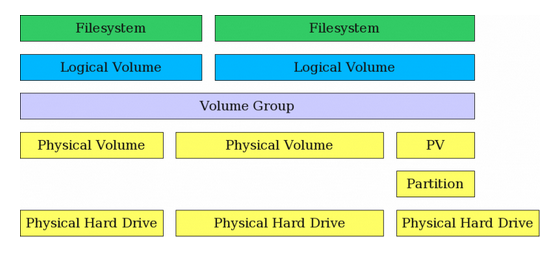 As we can see from the figure, not only complete physical hard drives can be physical volumes but also partitions from other drives can be physical volumes
Logical volume creation
To create a logical volume and mount it the first step is to create a physical volume
pvcreate /dev/[physical drive or partition name]After we create the physical volume, we either create a volume group or exist a new one
vgcreate [volume group name] [physical volume]A volume group will be created with the name /dev/[volume group name]
we can also extend with
vgextend [volume group] [physical volume]To create the logical volume we then use:
lvcreate -n [name] -L [size] [volume group]the flag-L refers to that we will indicate a fixed this, we can also use -l to give a percentage to use
Finally we create a file system on top of the volume. To create am ext4 fs we use:
mkfs.ext4 [volume path]to get the volume path we can use lvdisplay